Label automation. The work that used to take a team, done by the system.
Bulk updates, AI checks, translation, comparison, agent access. A new way to work with labels: you decide, the system does.
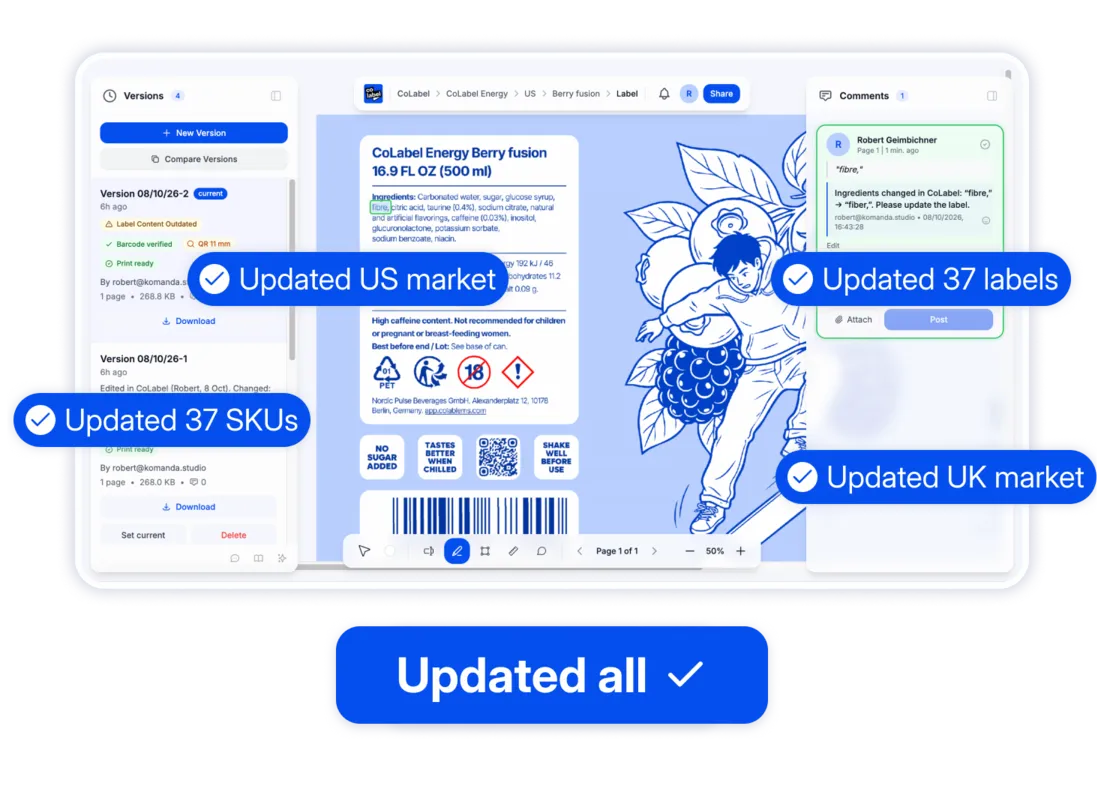
A few words on a label need to change. Here’s what happens next.
Old way
- Find every label that carries them. Open folders. Hope the list is complete.
- Write the brief, email it, attach a version.
- Open each design file. Edit by hand — on every layer the words appear. One layer is missed.
- Export, rename, send back. Compare old and new by eye.
- Files go to print.
- The mistake is found after printing. Stock comes back.
- Money wasted, production delayed. Start again from step 1.
Weeks lost. Money printed and binned. Launch slips. Start over.
 Weeks lost. Money printed and binned. Launch slips. Start over.
New way
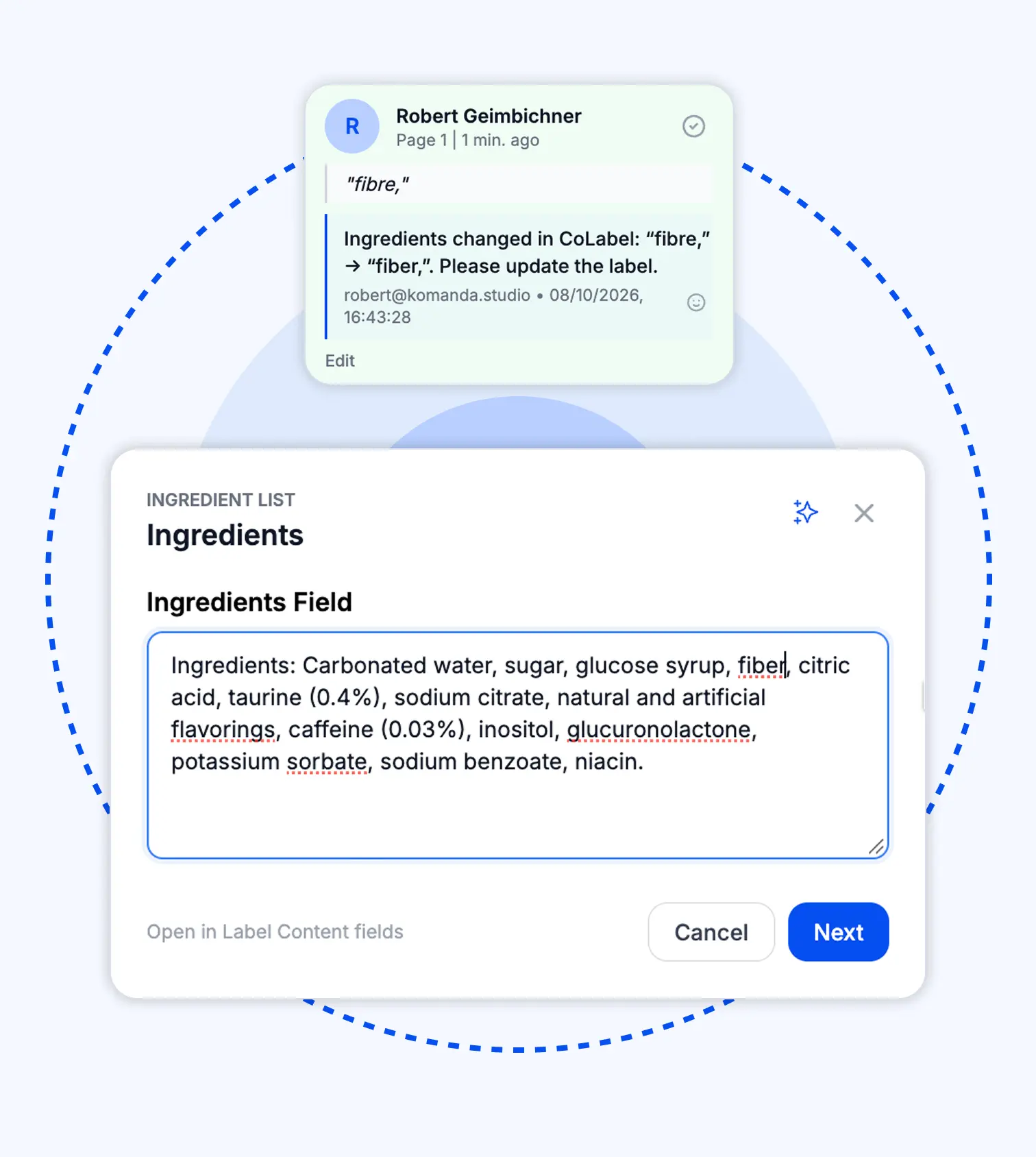
- Edit the words on the PDF. The comment pins itself to the change, the designer is notified, every label carrying them is listed.
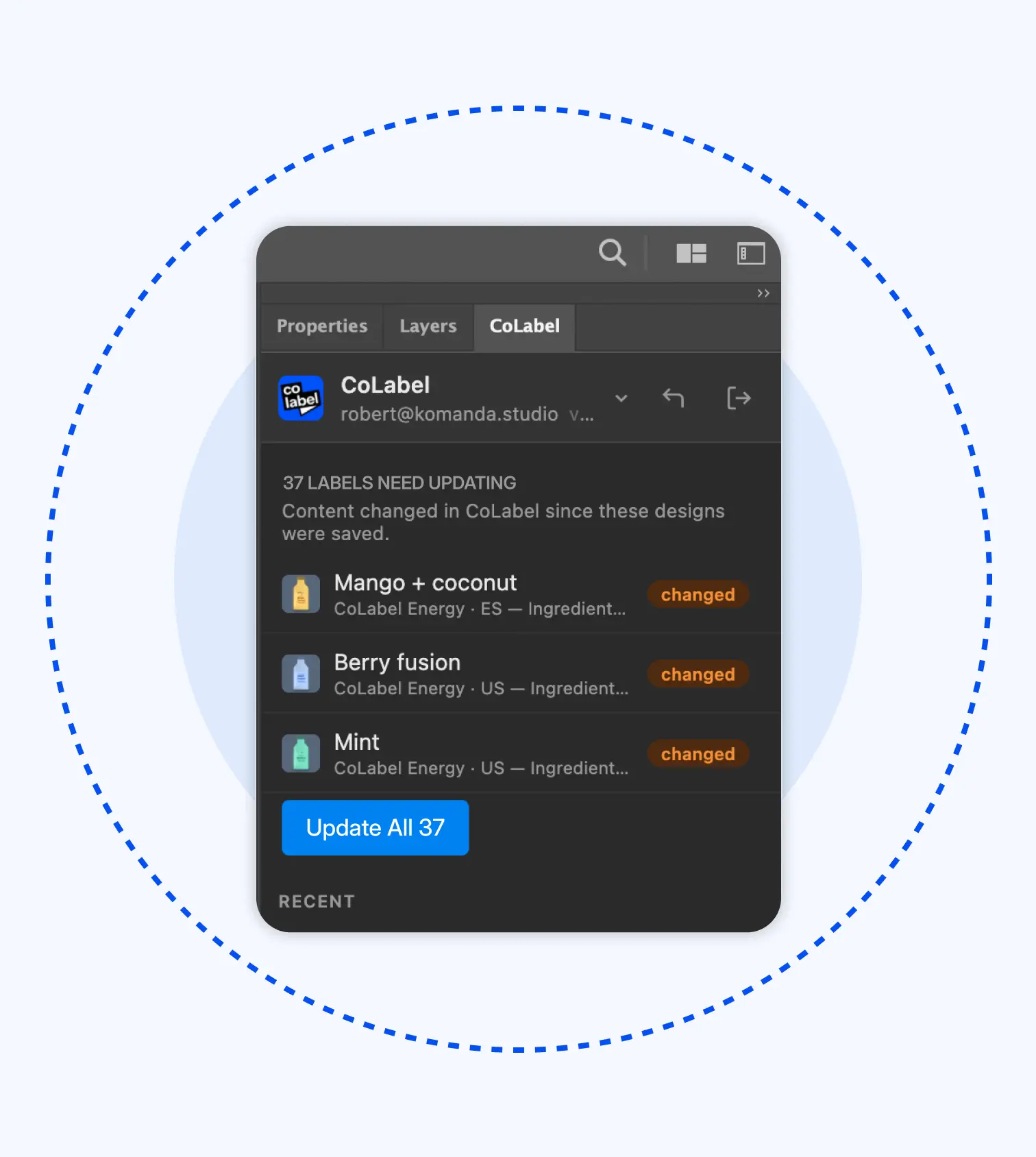
- One click in the design file. The words are rewritten everywhere they appear — every layer, every label, styling untouched.
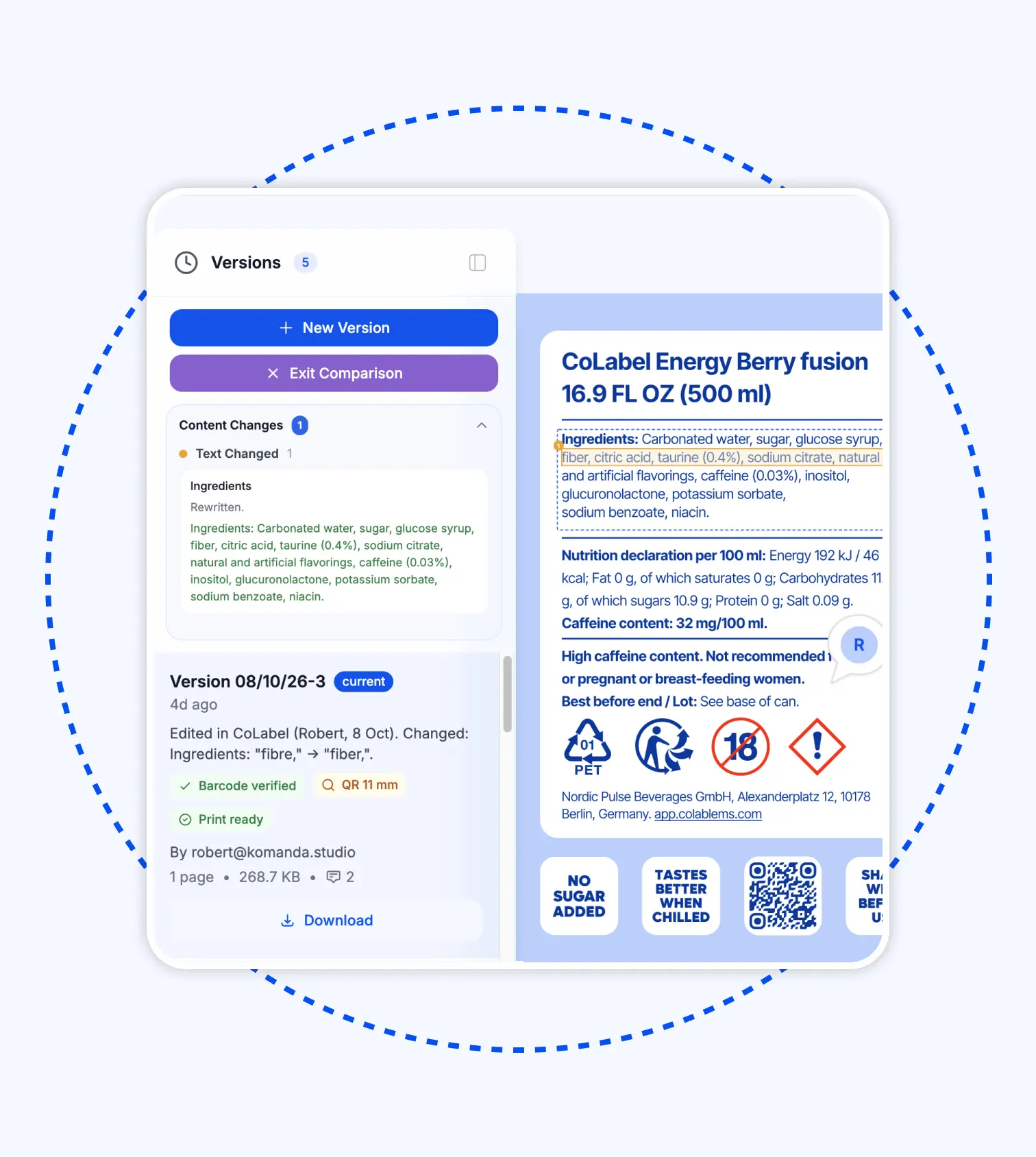
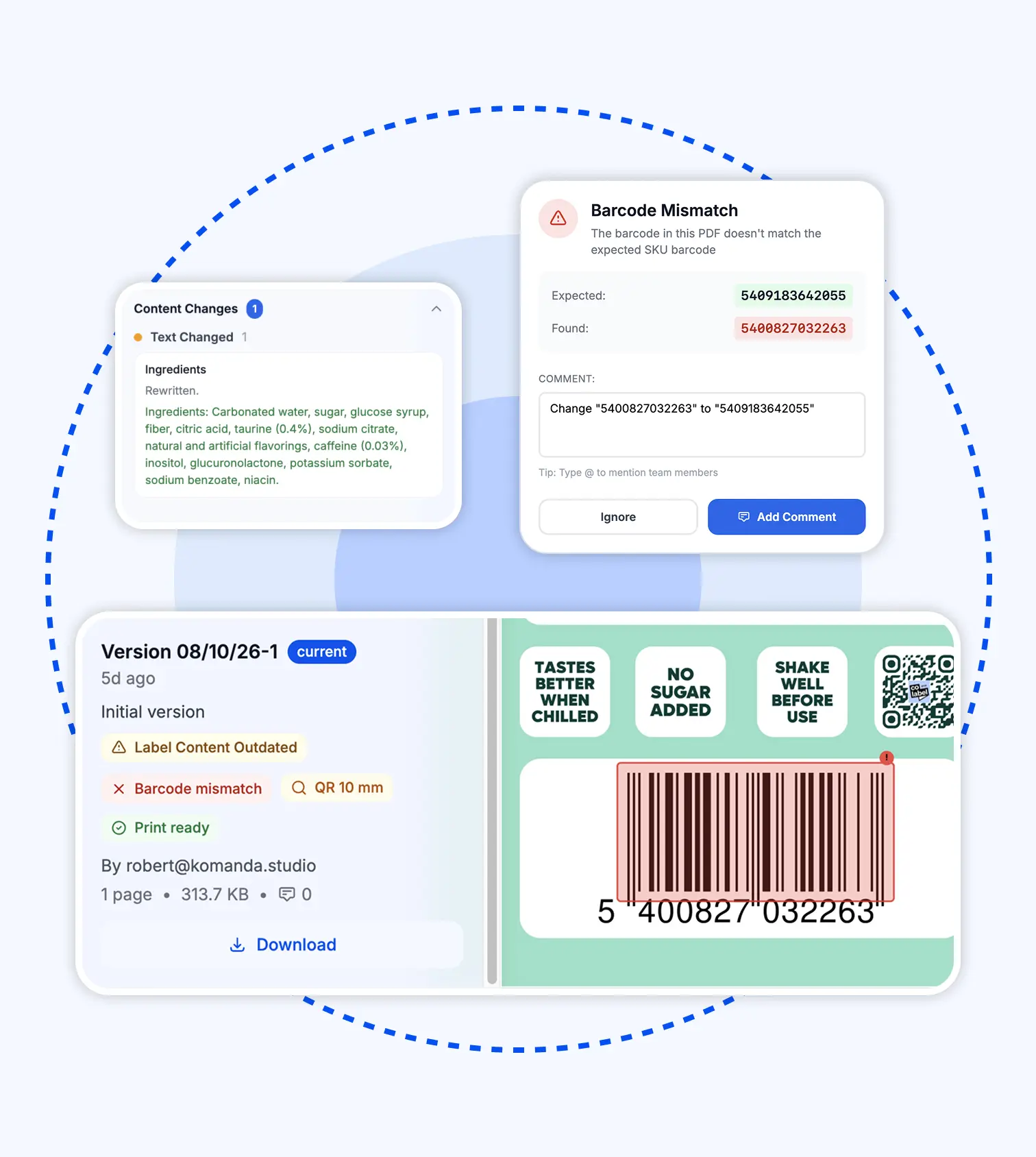
- Saved as a new version each, with a note of what changed. The system names what moved and checks the barcode.
- Approve. Live, print-ready.
Minutes. Zero missed. Can be done alone.
 Minutes. Zero missed. Can be done alone.
Every step on the left is an automation on the right. Here they are.
Everything the system does so you don’t.
Each one replaces a job that was done by hand. Each one is on every plan.
Replaces: opening every file, editing every layer.
Change the text once. Every label that carries it is rewritten in the design — every layer, every file — without touching the layout. One new version each, with a note of what changed.
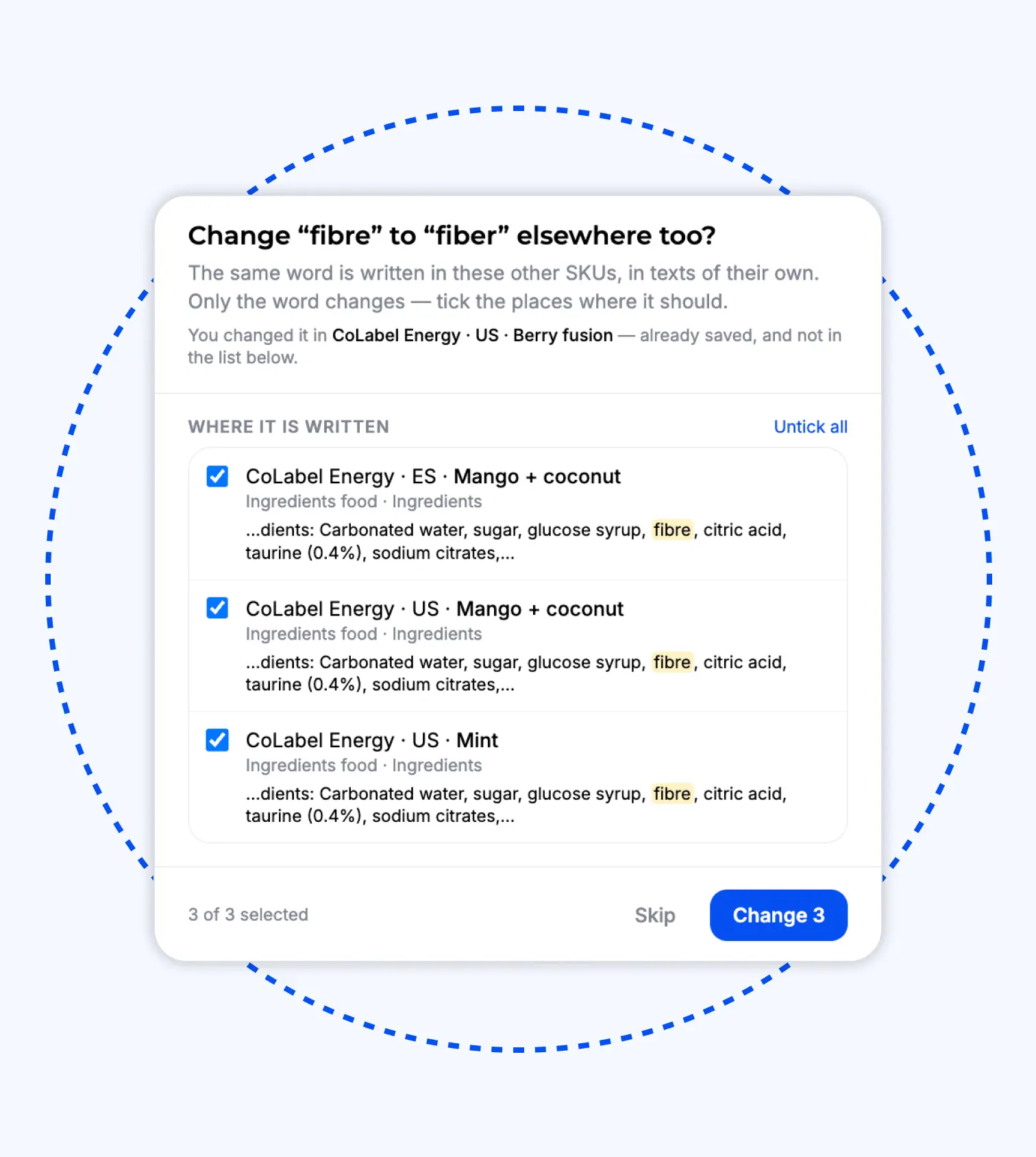
Replaces: hoping the Swedish label says what the English one says.
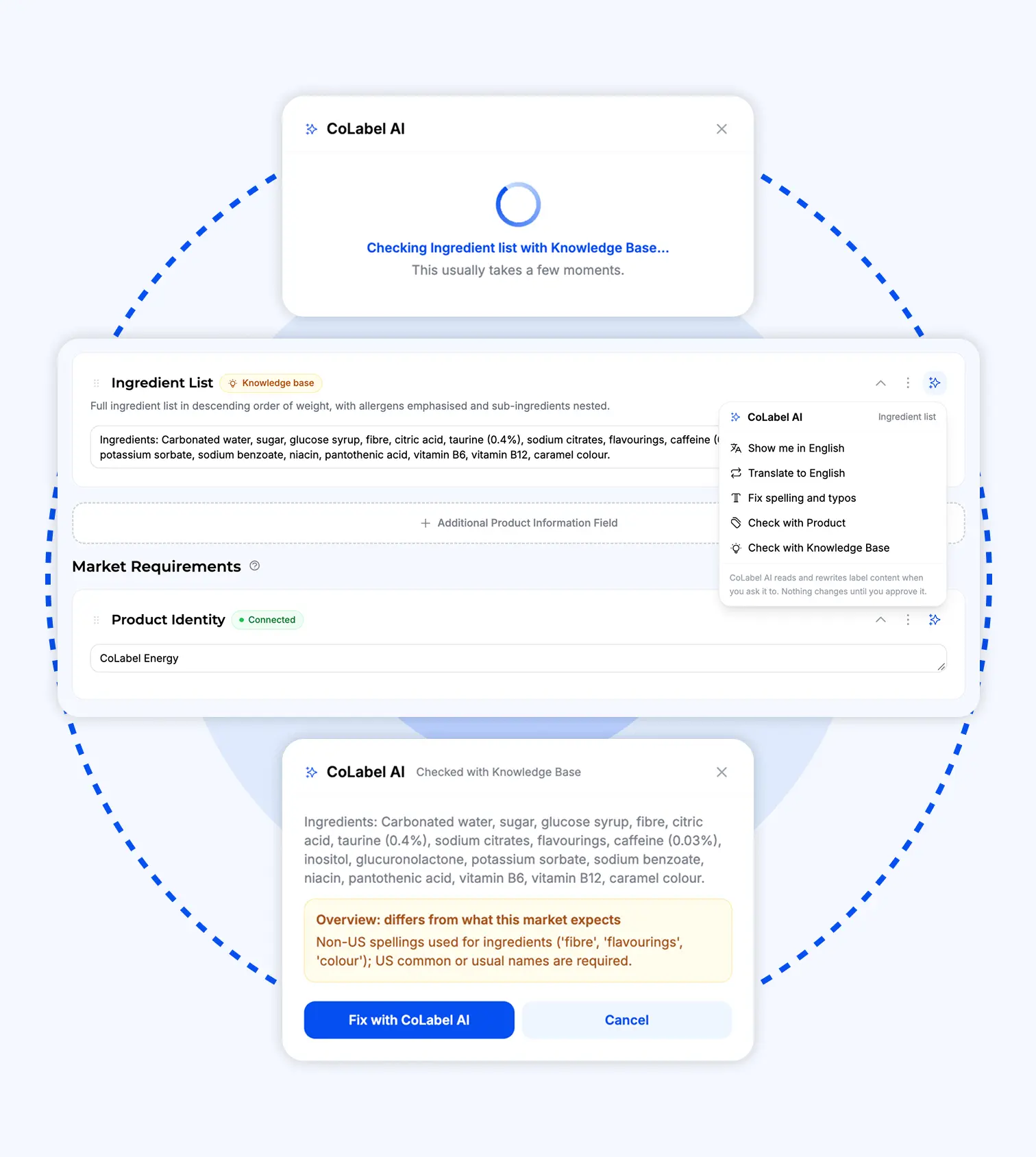
Fix a sentence on one SKU and CoLabel finds every other product and market that carries the same words — and offers to align them. One yes, and the whole range says the same thing.
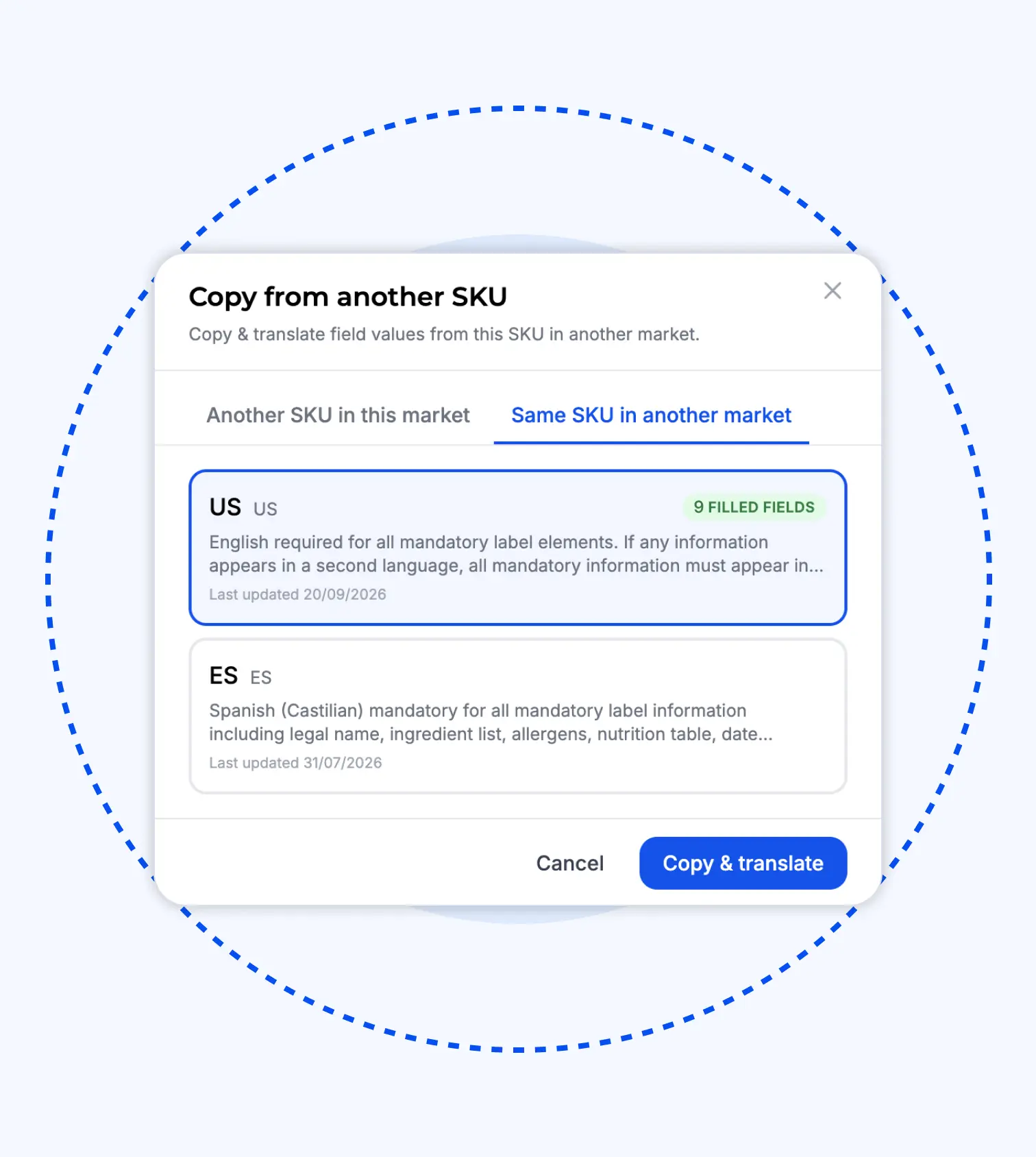
Replaces: a blank brief and a new design job.
Duplicate a product’s content, translate it, align it to the new market’s rules, reuse the existing design with the new content swapped in. What’s left is the 20% that actually differs.
Replaces: the brief, the email, the screenshot with arrows.
Highlight the words, type the fix. The comment pins itself to the change, the designer is notified, and the content field is already updated.
Replaces: reading feedback and retyping it.
Anyone — your team, your distributor, your lawyer — leaves a comment on the file. Click the AI icon and, if it’s a content change, it becomes one. Reviewed, applied, tracked.
Replaces: two PDFs side by side and a squint.
Every save is checked — content against design, design against print file, barcode against SKU. Any two versions compared, every change named. And if a change was wrong, one click restores the previous one.
Replaces: asking a colleague about the Swedish.
Content into any market’s language, checked against the knowledge base for that market and category. Shown before written.
Make AI do labels for you.
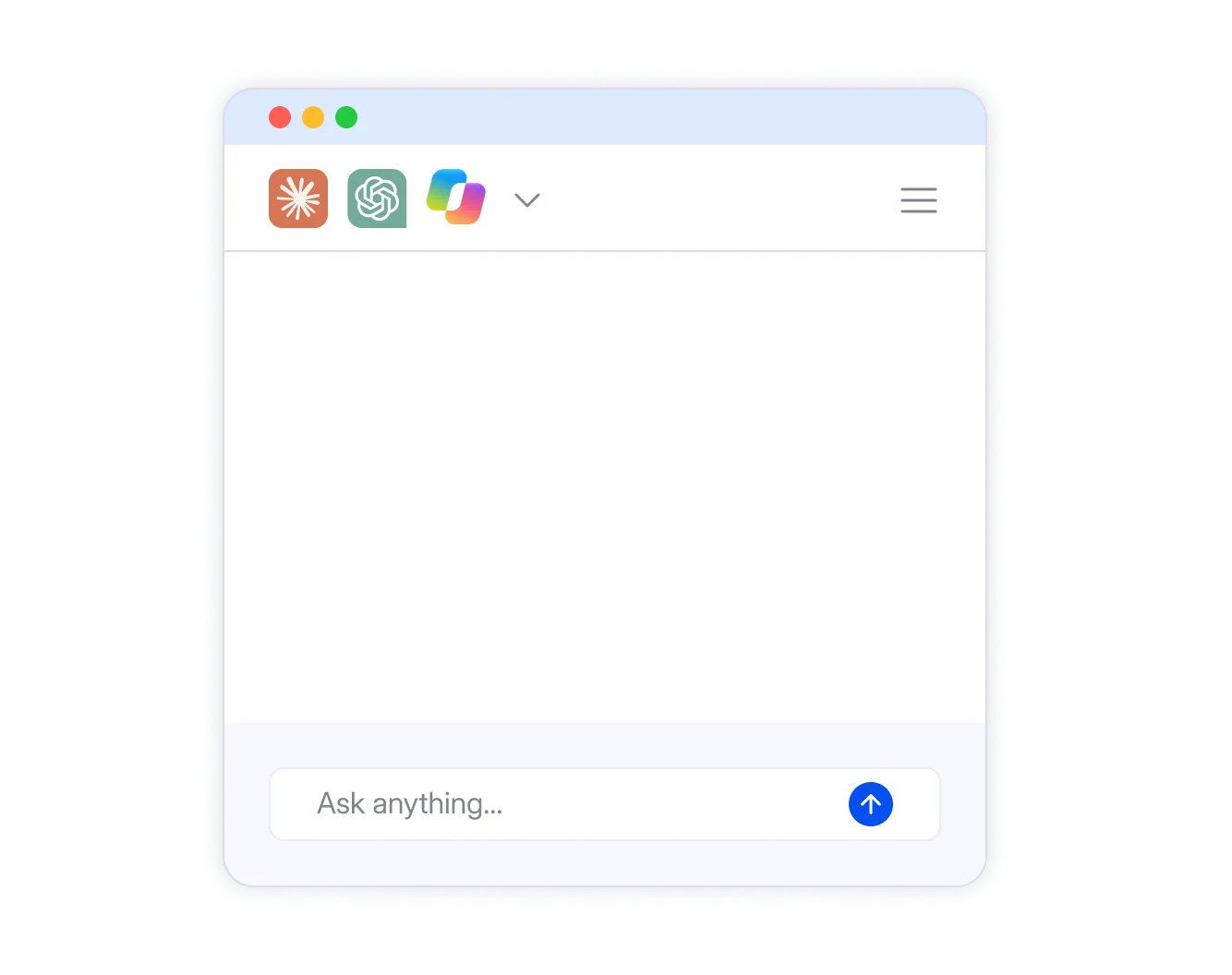
Our system, your agent.'%3e%3cpath%20d='M9.03219%200H30.9677C35.9355%200%2040%204.08335%2040%209.07401V30.9259C40%2035.9166%2035.9355%2039.9999%2030.9677%2039.9999H9.03219C4.06453%2039.9999%200%2035.9166%200%2030.9259V9.07401C0%204.08335%204.06453%200%209.03219%200Z'%20fill-rule='evenodd'%20clip-rule='evenodd'%20fill='%23D77655'/%3e%3cpath%20d='M11.1152%2024.8505L16.8695%2021.607L16.9662%2021.3253L16.8695%2021.1687L16.5891%2021.1686L15.6273%2021.109L12.3395%2021.0197L9.48812%2020.9007L6.72555%2020.7519L6.03047%2020.6032L5.37891%2019.7402L5.44602%2019.3098L6.03055%2018.915L6.86781%2018.9884L8.71805%2019.1153L11.4944%2019.3077L13.5086%2019.4268L16.4924%2019.7382H16.9662L17.0334%2019.5459L16.8714%2019.4268L16.745%2019.3077L13.8719%2017.3517L10.7617%2015.2845L9.13266%2014.0942L8.25195%2013.4912L7.80766%2012.9257L7.61617%2011.6918L8.41594%2010.8071L9.49016%2010.8804L9.76461%2010.9539L10.8527%2011.795L13.1769%2013.6023L16.2119%2015.848L16.6562%2016.219L16.8339%2016.092L16.8556%2016.0027L16.6562%2015.6675L15.0054%2012.6699L13.244%209.62082L12.46%208.3571L12.2527%207.59931C12.1796%207.28787%2012.1263%207.02604%2012.1263%206.7066L13.0366%205.4647L13.5402%205.302L14.7546%205.4647L15.2661%205.91106L16.0204%207.64499L17.2427%2010.3748L19.1384%2014.0865L19.6934%2015.1875L19.9895%2016.2072L20.1002%2016.5186L20.2915%2016.5185V16.34L20.4475%2014.249L20.7358%2011.682L21.0162%208.37892L21.113%207.44854L21.571%206.33355L22.4813%205.73054L23.1922%206.0718L23.7767%206.91286L23.6958%207.45646L23.3482%209.72591L22.667%2013.2809L22.2227%2015.6615H22.4815L22.7777%2015.3639L23.9763%2013.765L25.9905%2011.2356L26.8791%2010.2318L27.9159%209.12289L28.5812%208.59515L29.8391%208.59507L30.7652%209.97777L30.3505%2011.4062L29.0552%2013.0567L27.9809%2014.4552L26.4406%2016.5382L25.479%2018.2046L25.5679%2018.3376L25.797%2018.3157L29.2763%2017.5718L31.1562%2017.2306L33.3995%2016.8438L34.4145%2017.3199L34.5251%2017.8039L34.1262%2018.7939L31.727%2019.389L28.913%2019.9545L24.7227%2020.9504L24.6714%2020.9881L24.7306%2021.0614L26.6184%2021.24L27.426%2021.2836H29.4027L33.0834%2021.5594L34.0451%2022.1982L34.6217%2022.9799L34.525%2023.5751L33.044%2024.3328L31.0456%2023.8567L26.3814%2022.7418L24.7819%2022.3411L24.5608%2022.341V22.474L25.8937%2023.7833L28.3363%2025.9992L31.3951%2028.8559L31.5511%2029.5622L31.1581%2030.1196L30.7435%2030.0601L28.0559%2028.0286L27.0192%2027.1142L24.6713%2025.1283L24.5154%2025.1282V25.3365L25.0565%2026.1321L27.9138%2030.4469L28.0619%2031.7701L27.8546%2032.2006L27.1141%2032.4605L26.3005%2032.3117L24.628%2029.9529L22.902%2027.2966L21.5099%2024.916L21.3402%2025.0132L20.5187%2033.9027L20.1336%2034.3569L19.245%2034.6982L18.5045%2034.1328L18.1116%2033.2183L18.5045%2031.4109L18.9784%2029.0523L19.3634%2027.1775L19.711%2024.8485L19.9184%2024.0748L19.9045%2024.0232L19.7348%2024.045L17.9871%2026.4554L15.3292%2030.0639L13.2262%2032.3255L12.7227%2032.5259L11.8498%2032.0716L11.9308%2031.2602L12.4185%2030.5382L15.3292%2026.8185L17.0847%2024.5133L18.2181%2023.1821L18.2102%2022.9897H18.1431L10.4123%2028.0326L9.03594%2028.2111L8.44352%2027.6536L8.51664%2026.7391L8.79703%2026.4416L11.1212%2024.8346L11.1133%2024.8426L11.1152%2024.8505Z'%20fill='%23FCF2EE'/%3e%3c/g%3e%3cdefs%3e%3cclipPath%20id='clip0_3315_1376'%3e%3crect%20width='40'%20height='40'%20fill='white'/%3e%3c/clipPath%3e%3c/defs%3e%3c/svg%3e "Claude")

'%3e%3cpath%20d='M27.1579%207.81062L26.7555%209.4192H22.8865C20.0195%209.4192%2017.5204%2011.3709%2016.8249%2014.1521L13.3224%2028.1638H6.32902C2.2643%2028.1638%20-0.718158%2024.344%200.267417%2020.4001L3.77853%206.35721C4.70562%202.64882%208.0374%200.046875%2011.8604%200.046875H21.0963C25.161%200.046875%2028.1434%203.86676%2027.1579%207.81062Z'%20fill='url(%23paint0_radial_3315_1387)'/%3e%3cpath%20d='M27.1579%207.81062L26.7555%209.4192H22.8865C20.0195%209.4192%2017.5204%2011.3709%2016.8249%2014.1521L13.3224%2028.1638H6.32902C2.2643%2028.1638%20-0.718158%2024.344%200.267417%2020.4001L3.77853%206.35721C4.70562%202.64882%208.0374%200.046875%2011.8604%200.046875H21.0963C25.161%200.046875%2028.1434%203.86676%2027.1579%207.81062Z'%20fill='url(%23paint1_linear_3315_1387)'/%3e%3cpath%20d='M12.9205%2029.7722L13.3228%2028.1636H17.1918C20.0589%2028.1636%2022.5579%2026.2119%2023.2534%2023.4306L26.756%209.41895H33.7493C37.8141%209.41895%2040.7965%2013.2388%2039.8109%2017.1827L36.3006%2031.2256C35.3735%2034.934%2032.041%2037.5359%2028.218%2037.5359H18.9821C14.9174%2037.5359%2011.9349%2033.716%2012.9205%2029.7722Z'%20fill='url(%23paint2_radial_3315_1387)'/%3e%3cpath%20d='M12.9205%2029.7722L13.3228%2028.1636H17.1918C20.0589%2028.1636%2022.5579%2026.2119%2023.2534%2023.4306L26.756%209.41895H33.7493C37.8141%209.41895%2040.7965%2013.2388%2039.8109%2017.1827L36.3006%2031.2256C35.3735%2034.934%2032.041%2037.5359%2028.218%2037.5359H18.9821C14.9174%2037.5359%2011.9349%2033.716%2012.9205%2029.7722Z'%20fill='url(%23paint3_linear_3315_1387)'/%3e%3c/g%3e%3cdefs%3e%3cradialGradient%20id='paint0_radial_3315_1387'%20cx='0'%20cy='0'%20r='1'%20gradientTransform='matrix(-16.2855%2032.3529%2064.9004%2025.7198%2021.1226%200.142993)'%20gradientUnits='userSpaceOnUse'%3e%3cstop%20offset='0.25'%20stop-color='%23109DF2'/%3e%3cstop%20offset='0.72'%20stop-color='%23AAD445'/%3e%3cstop%20offset='0.97'%20stop-color='%23FFD400'/%3e%3c/radialGradient%3e%3clinearGradient%20id='paint1_linear_3315_1387'%20x1='13.791'%20y1='0.055452'%20x2='13.6343'%20y2='28.1724'%20gradientUnits='userSpaceOnUse'%3e%3cstop%20stop-color='%233DCBFF'/%3e%3cstop%20offset='0.25'%20stop-color='%230588F7'%20stop-opacity='0'/%3e%3c/linearGradient%3e%3cradialGradient%20id='paint2_radial_3315_1387'%20cx='0'%20cy='0'%20r='1'%20gradientTransform='matrix(-16.5736%2033.9108%2041.0894%2020.4379%2036.5789%206.93908)'%20gradientUnits='userSpaceOnUse'%3e%3cstop%20offset='0.07'%20stop-color='%238C48FF'/%3e%3cstop%20offset='0.5'%20stop-color='%23F2598A'/%3e%3cstop%20offset='0.9'%20stop-color='%23FFB152'/%3e%3c/radialGradient%3e%3clinearGradient%20id='paint3_linear_3315_1387'%20x1='26.3981'%20y1='7.68171'%20x2='26.3825'%20y2='15.3394'%20gradientUnits='userSpaceOnUse'%3e%3cstop%20offset='0.06'%20stop-color='%23F8ADFA'/%3e%3cstop%20offset='0.71'%20stop-color='%23A86EDD'%20stop-opacity='0'/%3e%3c/linearGradient%3e%3cclipPath%20id='clip0_3315_1387'%3e%3crect%20width='40'%20height='37.5049'%20fill='white'/%3e%3c/clipPath%3e%3c/defs%3e%3c/svg%3e "Microsoft Copilot")

Hand the job to your agent. Change a word across the range, compare versions, notify the designer, upload — one request, done, with the same records and approvals as a click. Need to know instead? What it says, which version is live, who approved it — just ask.
Same system. Same records. Same approvals. The agent is just faster hands.
We didn’t replace the people. We replaced the mechanical part.
The designer still designs — just not the retyping, the layer-by-layer edits, the re-exports. The product team still decides what the label says, checks it, approves it — just not the folder hunting, the side-by-side comparing, the chasing. Every judgment stays with the person who should make it. Every repetition goes to the system.
Designer
Creates. Doesn’t retype.
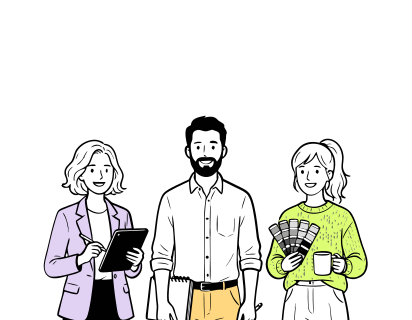
Product / brand
Decides and checks.Doesn’t hunt or compare.

The system
Finds, updates, verifies, records.Shows its work first.
CoLabel in numbers.
338 labels
updated in one run — our biggest so far
200+ hours
saved per workspace, per year
100% saved
every change kept — every save a version, every version restorable
5 clicks
from a wrong word to every label live and print-ready
Savings based on a typical workspace of 50 labels across 3 markets with two content changes a month.
Trusted by teams who print.


'%3e%3cpath%20id='Vector'%20d='M0%2014.3886H6.73782V40.9652C6.73782%2041.9132%207.47898%2042.658%208.42228%2042.658C9.36557%2042.658%2010.1067%2041.9132%2010.1067%2040.9652V6.94039H2.69513V0.846389H16.8446V40.2881C16.8446%2044.9602%2014.4189%2048.752%208.42228%2048.752C2.42562%2048.752%200%2044.9602%200%2040.2881V14.3886Z'%20fill='black'/%3e%3cpath%20id='Vector_2'%20d='M112.239%200C106.127%200%20103.655%203.85276%20103.655%208.60269V48.3085H110.524V33.8285H113.957V48.3085H120.826V8.60269C120.826%203.85276%20118.353%200%20112.239%200ZM110.524%2027.0574V7.91204C110.524%206.95054%20111.278%206.19218%20112.239%206.19218C113.199%206.19218%20113.957%206.95054%20113.957%207.91204V27.0574H110.524Z'%20fill='black'/%3e%3cpath%20id='Vector_3'%20d='M19.5397%2044.0122V0.846389H26.2775V41.2022C26.2775%2042.1502%2027.0187%2042.895%2027.962%2042.895C28.9053%2042.895%2029.6464%2042.1502%2029.6464%2041.2022V0.846389H36.3842V48.3119H29.6464V43.9784H28.9726V44.0122C28.9726%2046.6529%2027.4903%2048.752%2024.2562%2048.752C21.022%2048.752%2019.5397%2046.6529%2019.5397%2044.0122Z'%20fill='black'/%3e%3cg%20id='Group'%3e%3cpath%20id='Vector_4'%20d='M38.8873%2012.574H45.6252V48.3119H38.8873V12.574Z'%20fill='black'/%3e%3cpath%20id='Vector_5'%20d='M42.2562%207.40421C44.1168%207.40421%2045.6252%205.88844%2045.6252%204.01865C45.6252%202.14886%2044.1168%200.633099%2042.2562%200.633099C40.3956%200.633099%2038.8873%202.14886%2038.8873%204.01865C38.8873%205.88844%2040.3956%207.40421%2042.2562%207.40421Z'%20fill='black'/%3e%3c/g%3e%3cpath%20id='Vector_6'%20d='M159.663%200.846389H143.189V7.16045H148.286V48.3085H154.566V7.16045H159.663V0.846389Z'%20fill='black'/%3e%3cpath%20id='Vector_7'%20d='M58.427%200.846389H65.1648V29.1158H58.427V7.65135C58.427%207.10967%2058.1575%206.56798%2057.7532%206.29713C57.4837%206.094%2057.1468%205.95858%2056.7426%205.95858C55.7993%205.95858%2055.0581%206.7034%2055.0581%207.65135V40.9652C55.0581%2041.9132%2055.7993%2042.658%2056.7426%2042.658C57.6859%2042.658%2058.427%2041.9132%2058.427%2040.9652V33.517H65.1648V40.2881C65.1648%2044.9602%2062.7392%2048.752%2056.7426%2048.752C50.7459%2048.752%2048.3203%2044.9602%2048.3203%2040.2881V4.73978C48.3203%202.09904%2049.7352%200%2053.0368%200C56.3383%200%2057.7532%202.09904%2057.7532%204.8752H58.427V0.846389Z'%20fill='black'/%3e%3cpath%20id='Vector_8'%20d='M140.164%200.846389V26.5326H133.409V7.63443C133.409%207.09274%20133.139%206.55105%20132.735%206.2802C132.466%206.07707%20132.125%205.94165%20131.721%205.94165C130.774%205.94165%20130.033%206.68647%20130.033%207.63443V21.996C130.033%2026.9422%20140.908%2031.5466%20140.908%2040.4878C140.908%2044.8247%20138.341%2048.752%20132.058%2048.752C125.775%2048.752%20123.275%2044.8214%20123.275%2039.9462V33.5102H130.03V40.6233C130.03%2041.7744%20130.909%2042.6546%20132.058%2042.6546C133.207%2042.6546%20134.083%2041.7744%20134.083%2040.6233C134.083%2032.6977%20123.275%2031.0049%20123.275%2021.996V4.74316C123.275%202.09904%20124.693%200%20128.005%200C131.317%200%20132.735%202.09904%20132.735%204.87858H133.409V0.846389H140.164Z'%20fill='black'/%3e%3cpath%20id='Vector_9'%20d='M101.178%200.846389V24.3151H94.4407V7.65135C94.4407%207.10967%2094.1712%206.56798%2093.7669%206.29713C93.4974%206.094%2093.1605%205.95858%2092.7562%205.95858C91.8129%205.95858%2091.0718%206.7034%2091.0718%207.65135V27.0574H94.3362V33.8285H91.0718V48.3085H84.3339V4.73978C84.3339%202.09904%2085.7489%200%2089.0504%200C92.3519%200%2093.7669%202.09904%2093.7669%204.8752H94.4407V0.846389H101.178Z'%20fill='black'/%3e%3cpath%20id='Vector_10'%20d='M74.2272%207.40082V27.0574H78.5327V33.8285H74.2272V42.8273H81.6388V48.3085H67.4894V0.846389H81.6388V7.40082H74.2272Z'%20fill='black'/%3e%3c/g%3e%3cdefs%3e%3cclipPath%20id='clip0_0_38'%3e%3crect%20width='159.663'%20height='48.752'%20fill='white'/%3e%3c/clipPath%3e%3c/defs%3e%3c/svg%3e)




“Migrating to CoLabel was surprisingly easy. We shared a Google Drive link and had a fully set-up account two days later. Along the way, CoLabel caught inconsistencies in our designs and labels we’d never spotted. Everything looks great so far, and we’re eager to use it more.”
 — DanielCEO, Frank
“We’re moving more of our marketing work to AI, and CoLabel is the first tool that lets an agent actually work with our print files. I ask it to change a line across every juice label and tell the designer — it’s done, with the same versions and approvals as if I’d clicked it myself.”
 — DavidCEO, Juicefast
“I’ve worked on label development projects for more than 15 years, and CoLabel is the first tool I’ve found that truly bridges the gap between designers and clients. It makes reviewing, commenting, and approving labels easy and efficient, and I’m really satisfied with it.”
 — ThuyBrand Manager, Thor
Frequently asked questions
No. Every update is listed first, applied on your click, and saved as a new version you can go back to.
You see it before it’s written. Reject it, or fix it — and the fix is tracked like any other change.
Yes. The extension lives inside it. Content changes arrive as a list; one click applies them.
Claude, ChatGPT, Copilot — anything that speaks MCP. Same permissions and records as a person in the app.
Every automation, every plan, including Free. See the plans
Try it on one label. That’s all it takes.
The first time every design updates itself, the old way stops making sense.
- Encrypted, backed up daily
- Your files stay in the EU
- No credit card needed
- GDPR compliant
 Encrypted, backed up daily
 Your files stay in the EU
 No credit card needed
 GDPR compliant