Label content, grouped into fields. Edit it like text. Print it like artwork.
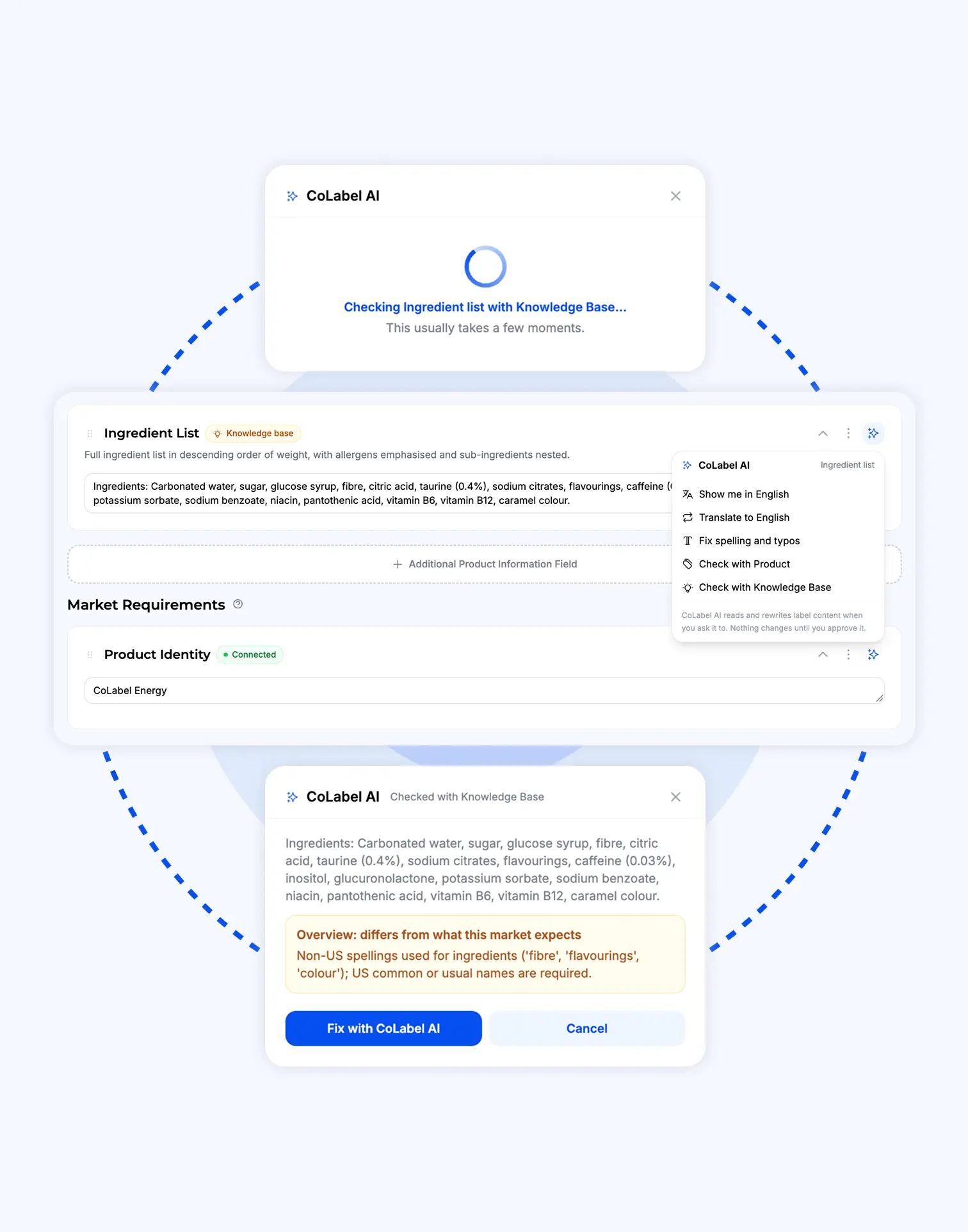
Ingredients, warnings, nutrition, addresses — each is a field on the SKU, linked to the artwork. Type the new text, save, and every design that carries it is updated in place. Every save is a version you can go back to.
What content fields fix.
The label text lives in a spreadsheet nobody trusts.
It lives on the SKU, with its history, linked to the artwork it prints on.
A designer for every typo.
Type the fix. The design updates itself.
Which fields does this product need here?
Regulations differ by market. Pick category and market; the required fields are already there — allergens, INCI, nicotine warnings.
Five markets, five sets of rules, five versions of the truth.
One set of content per product. What’s market-specific is marked as market-specific — the rest stays one thing, everywhere.
Content that knows what it is.
304 sub-categories across six industries. Pick yours and the SKU arrives with the right fields: ingredient list, allergens, nutrition table, warnings, manufacturer block. Custom fields for anything else.
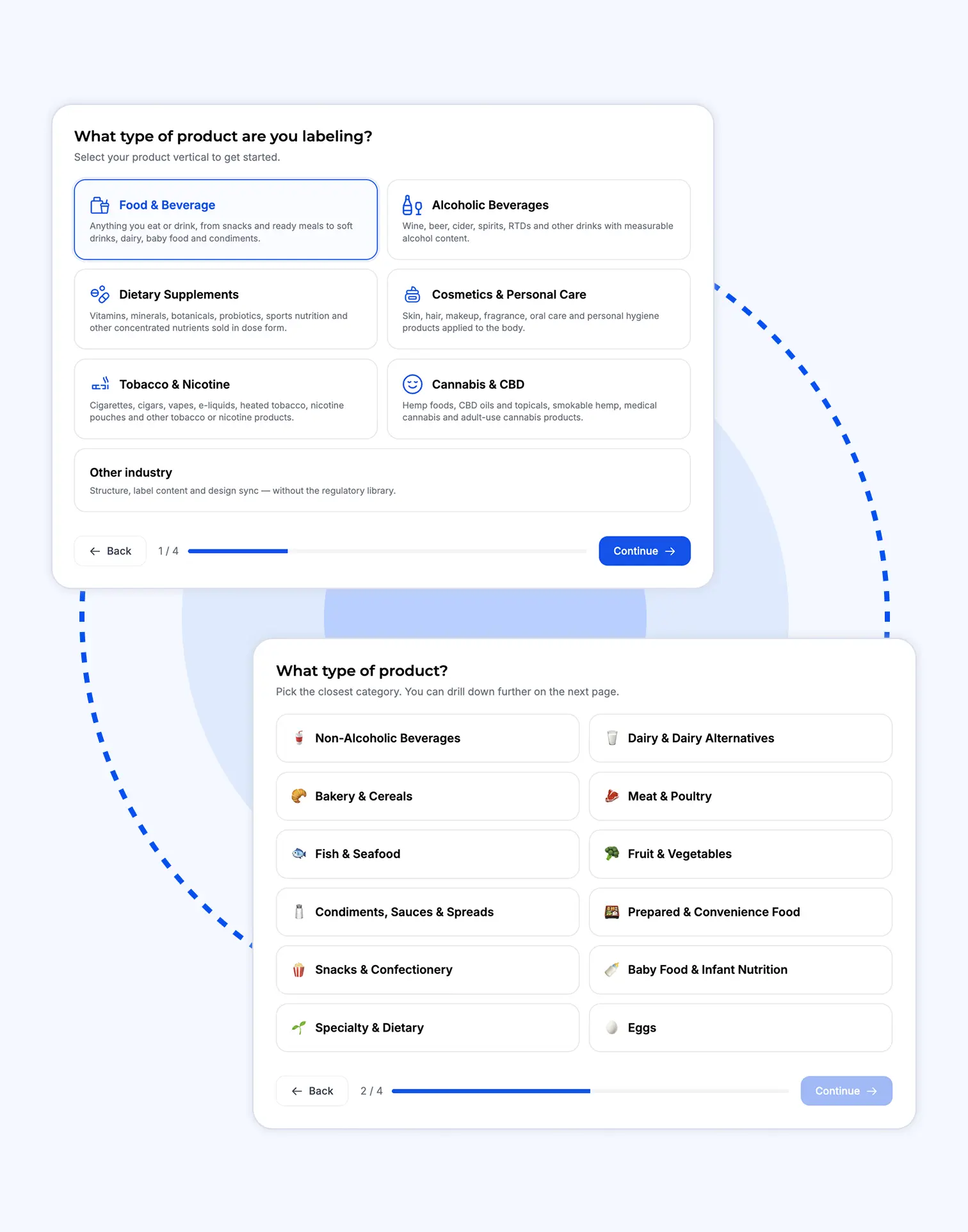
Read in from the design file, the PDF, a photo of the pack, a Word doc or a spreadsheet. Or start from another SKU or market: copy its content, cross-check the differences, change what’s different. The fastest way to a new label is an old one.
Product information, market information, marketing copy. Set the manufacturer once at product level; override it per market where a local entity is named.
Highlight the words in the viewer, type the fix. The field updates, the comment pins itself, the designer is notified.
Fix a sentence on one SKU and CoLabel finds every other label in the product, the market, the whole workspace that carries it — and offers the same fix. Nothing drifts out of line.
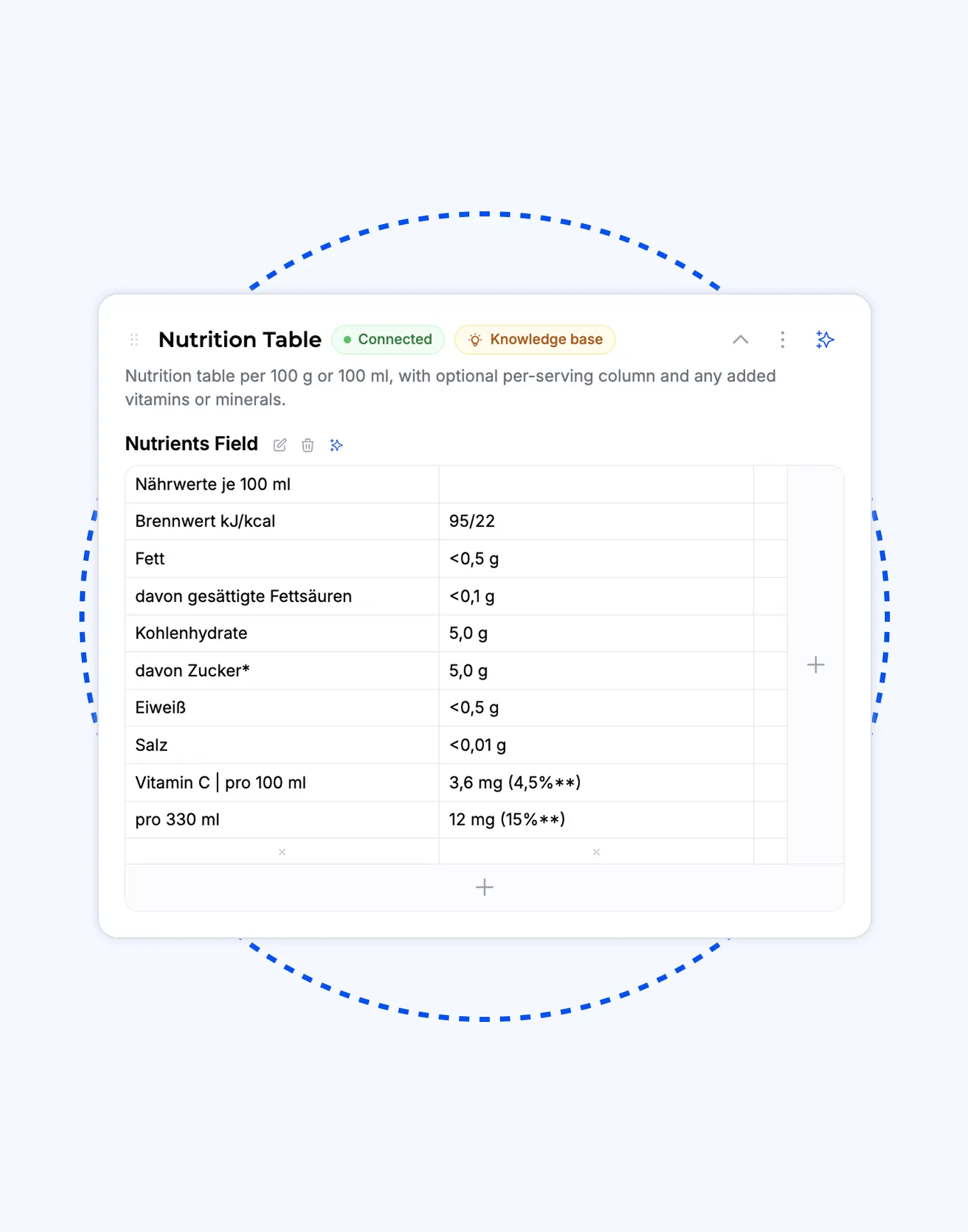
Read and edited cell by cell. A changed number is reported as that number, not “the table changed”.
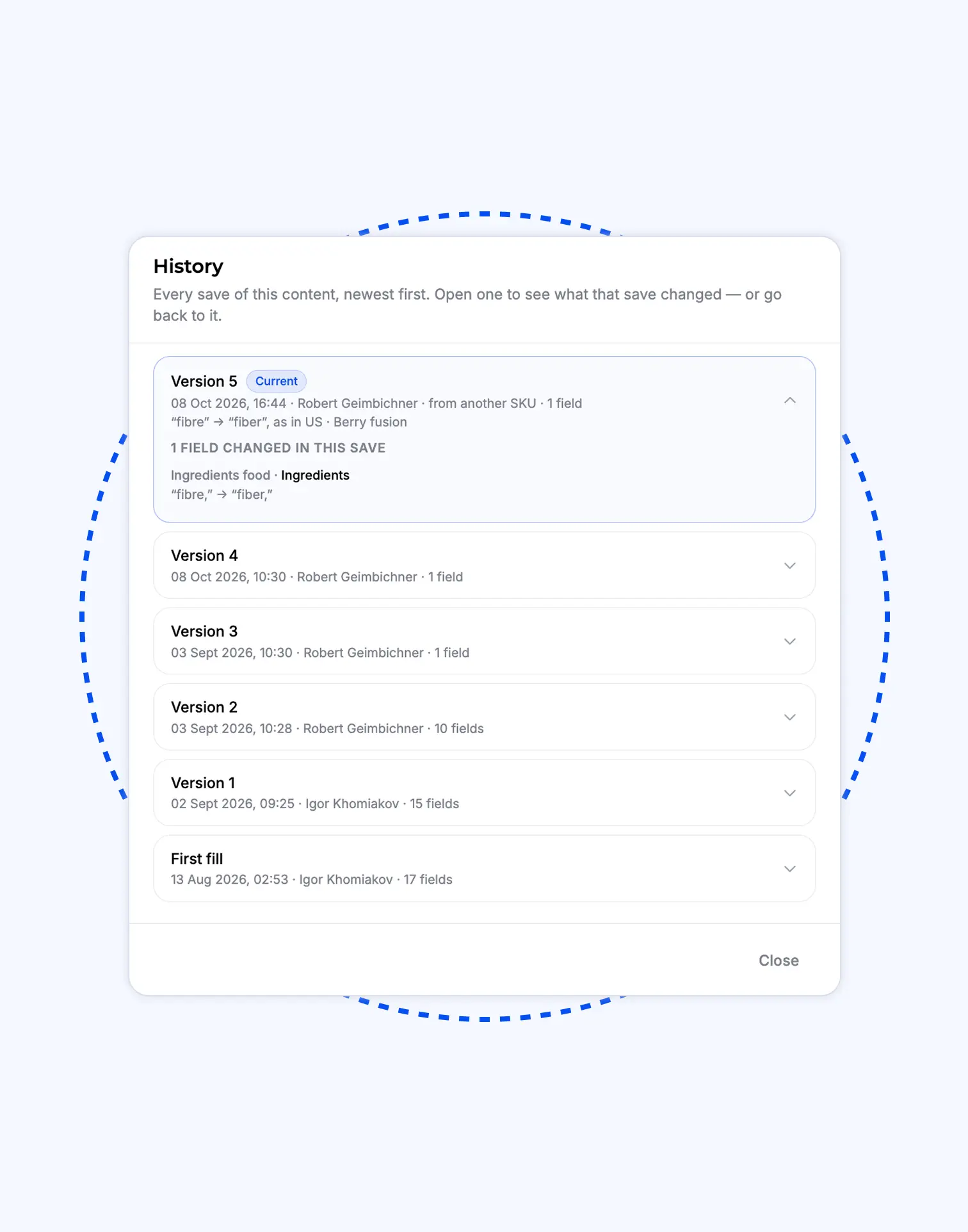
Every save is a version. See what each one changed, restore one field or all of them, undo an Update all.
Fields into any market’s language, checked against that market’s rules. Shown before written.
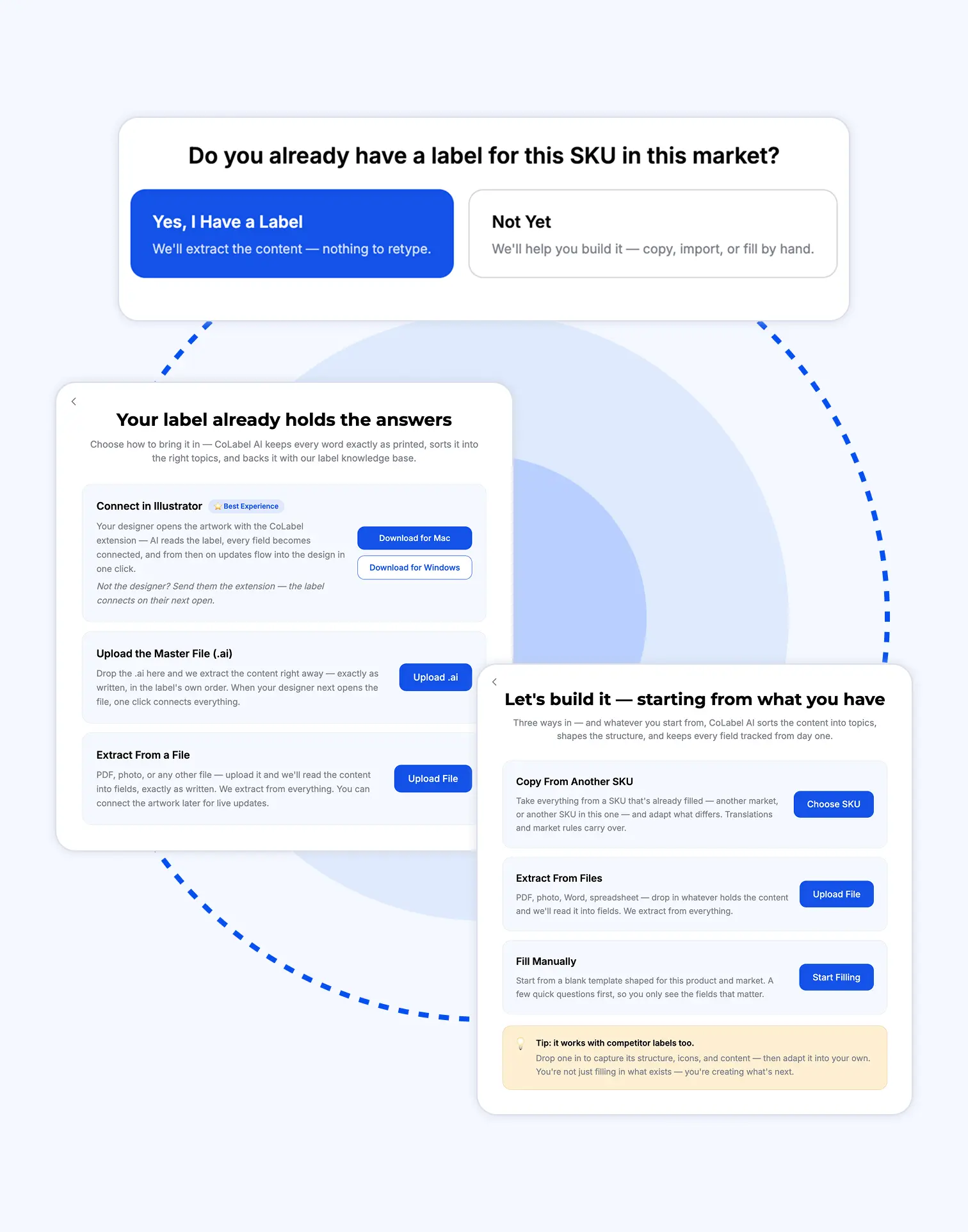
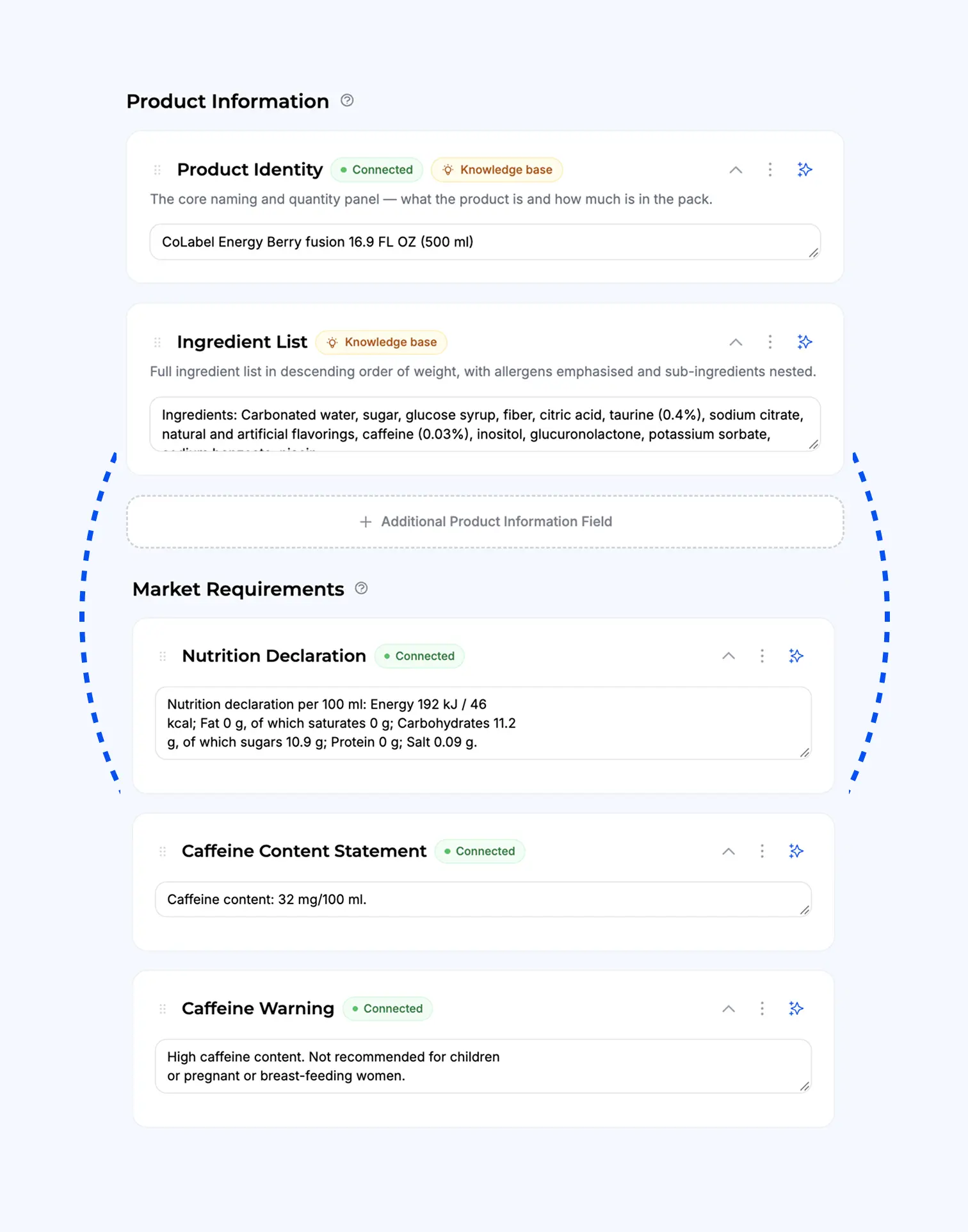
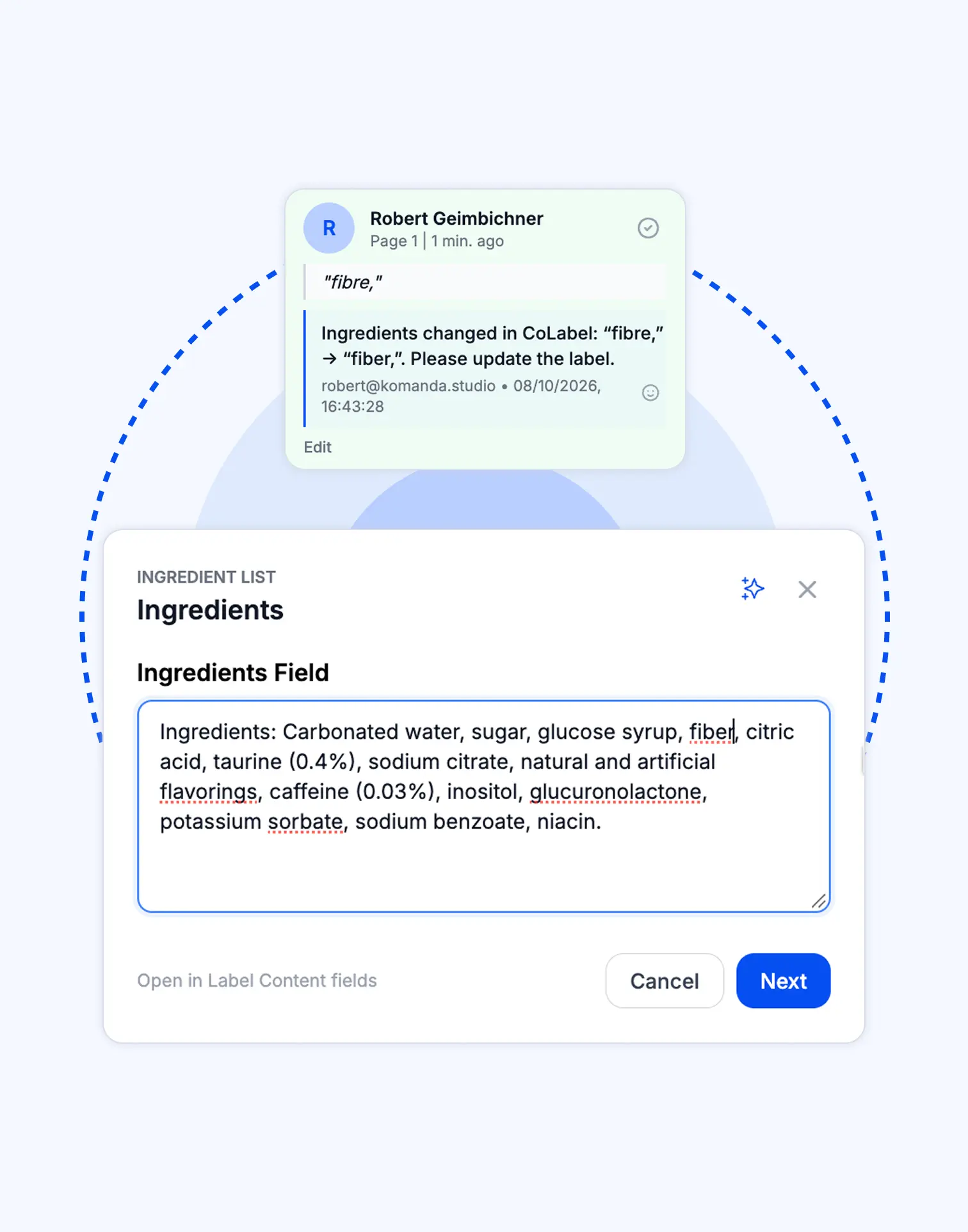
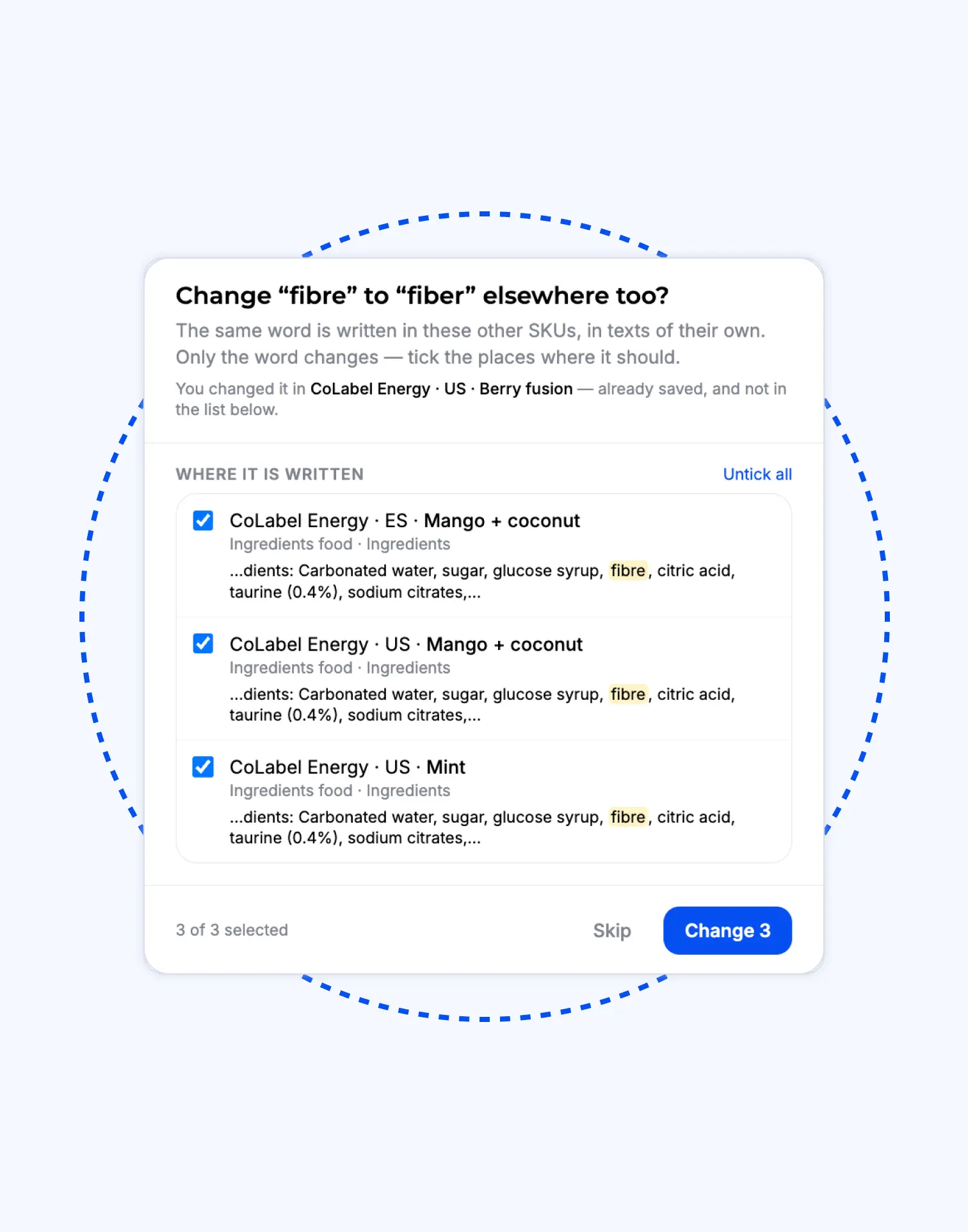
The allergen line needs one more word.
Old way
- Open the spreadsheet. Find the row. Hope it’s the current one.
- Email the designer the new sentence. And the old one, so they can find it.
- Designer searches the file, edits, exports, sends back.
- Open the PDF. Check by eye. Was it the Swedish one too?
Two days. Three people. One label.
 Two days. Three people. One label.
New way
- Type the word into the field.
- Every label with that line is listed. Yes to all.
- Designs updated, versions saved.
Five minutes. One person. Every label.
 Five minutes. One person. Every label.
Trusted by teams who print.


'%3e%3cpath%20id='Vector'%20d='M0%2014.3886H6.73782V40.9652C6.73782%2041.9132%207.47898%2042.658%208.42228%2042.658C9.36557%2042.658%2010.1067%2041.9132%2010.1067%2040.9652V6.94039H2.69513V0.846389H16.8446V40.2881C16.8446%2044.9602%2014.4189%2048.752%208.42228%2048.752C2.42562%2048.752%200%2044.9602%200%2040.2881V14.3886Z'%20fill='black'/%3e%3cpath%20id='Vector_2'%20d='M112.239%200C106.127%200%20103.655%203.85276%20103.655%208.60269V48.3085H110.524V33.8285H113.957V48.3085H120.826V8.60269C120.826%203.85276%20118.353%200%20112.239%200ZM110.524%2027.0574V7.91204C110.524%206.95054%20111.278%206.19218%20112.239%206.19218C113.199%206.19218%20113.957%206.95054%20113.957%207.91204V27.0574H110.524Z'%20fill='black'/%3e%3cpath%20id='Vector_3'%20d='M19.5397%2044.0122V0.846389H26.2775V41.2022C26.2775%2042.1502%2027.0187%2042.895%2027.962%2042.895C28.9053%2042.895%2029.6464%2042.1502%2029.6464%2041.2022V0.846389H36.3842V48.3119H29.6464V43.9784H28.9726V44.0122C28.9726%2046.6529%2027.4903%2048.752%2024.2562%2048.752C21.022%2048.752%2019.5397%2046.6529%2019.5397%2044.0122Z'%20fill='black'/%3e%3cg%20id='Group'%3e%3cpath%20id='Vector_4'%20d='M38.8873%2012.574H45.6252V48.3119H38.8873V12.574Z'%20fill='black'/%3e%3cpath%20id='Vector_5'%20d='M42.2562%207.40421C44.1168%207.40421%2045.6252%205.88844%2045.6252%204.01865C45.6252%202.14886%2044.1168%200.633099%2042.2562%200.633099C40.3956%200.633099%2038.8873%202.14886%2038.8873%204.01865C38.8873%205.88844%2040.3956%207.40421%2042.2562%207.40421Z'%20fill='black'/%3e%3c/g%3e%3cpath%20id='Vector_6'%20d='M159.663%200.846389H143.189V7.16045H148.286V48.3085H154.566V7.16045H159.663V0.846389Z'%20fill='black'/%3e%3cpath%20id='Vector_7'%20d='M58.427%200.846389H65.1648V29.1158H58.427V7.65135C58.427%207.10967%2058.1575%206.56798%2057.7532%206.29713C57.4837%206.094%2057.1468%205.95858%2056.7426%205.95858C55.7993%205.95858%2055.0581%206.7034%2055.0581%207.65135V40.9652C55.0581%2041.9132%2055.7993%2042.658%2056.7426%2042.658C57.6859%2042.658%2058.427%2041.9132%2058.427%2040.9652V33.517H65.1648V40.2881C65.1648%2044.9602%2062.7392%2048.752%2056.7426%2048.752C50.7459%2048.752%2048.3203%2044.9602%2048.3203%2040.2881V4.73978C48.3203%202.09904%2049.7352%200%2053.0368%200C56.3383%200%2057.7532%202.09904%2057.7532%204.8752H58.427V0.846389Z'%20fill='black'/%3e%3cpath%20id='Vector_8'%20d='M140.164%200.846389V26.5326H133.409V7.63443C133.409%207.09274%20133.139%206.55105%20132.735%206.2802C132.466%206.07707%20132.125%205.94165%20131.721%205.94165C130.774%205.94165%20130.033%206.68647%20130.033%207.63443V21.996C130.033%2026.9422%20140.908%2031.5466%20140.908%2040.4878C140.908%2044.8247%20138.341%2048.752%20132.058%2048.752C125.775%2048.752%20123.275%2044.8214%20123.275%2039.9462V33.5102H130.03V40.6233C130.03%2041.7744%20130.909%2042.6546%20132.058%2042.6546C133.207%2042.6546%20134.083%2041.7744%20134.083%2040.6233C134.083%2032.6977%20123.275%2031.0049%20123.275%2021.996V4.74316C123.275%202.09904%20124.693%200%20128.005%200C131.317%200%20132.735%202.09904%20132.735%204.87858H133.409V0.846389H140.164Z'%20fill='black'/%3e%3cpath%20id='Vector_9'%20d='M101.178%200.846389V24.3151H94.4407V7.65135C94.4407%207.10967%2094.1712%206.56798%2093.7669%206.29713C93.4974%206.094%2093.1605%205.95858%2092.7562%205.95858C91.8129%205.95858%2091.0718%206.7034%2091.0718%207.65135V27.0574H94.3362V33.8285H91.0718V48.3085H84.3339V4.73978C84.3339%202.09904%2085.7489%200%2089.0504%200C92.3519%200%2093.7669%202.09904%2093.7669%204.8752H94.4407V0.846389H101.178Z'%20fill='black'/%3e%3cpath%20id='Vector_10'%20d='M74.2272%207.40082V27.0574H78.5327V33.8285H74.2272V42.8273H81.6388V48.3085H67.4894V0.846389H81.6388V7.40082H74.2272Z'%20fill='black'/%3e%3c/g%3e%3cdefs%3e%3cclipPath%20id='clip0_0_38'%3e%3crect%20width='159.663'%20height='48.752'%20fill='white'/%3e%3c/clipPath%3e%3c/defs%3e%3c/svg%3e)




“Migrating to CoLabel was surprisingly easy. We shared a Google Drive link and had a fully set-up account two days later. Along the way, CoLabel caught inconsistencies in our designs and labels we’d never spotted. Everything looks great so far, and we’re eager to use it more.”
 — DanielCEO, Frank
“We’re moving more of our marketing work to AI, and CoLabel is the first tool that lets an agent actually work with our print files. I ask it to change a line across every juice label and tell the designer — it’s done, with the same versions and approvals as if I’d clicked it myself.”
 — DavidCEO, Juicefast
“I’ve worked on label development projects for more than 15 years, and CoLabel is the first tool I’ve found that truly bridges the gap between designers and clients. It makes reviewing, commenting, and approving labels easy and efficient, and I’m really satisfied with it.”
 — ThuyBrand Manager, Thor

Frequently asked questions
No. Required ones are marked; the rest are optional.
Choose Other and add custom fields. Everything else works the same.
Yes. Product-level content is shared; market-level overrides it where a market needs something different.
Field history. Restore one field or all, one click.
Editors and admins. Designers see them but can’t change them; commenters can suggest.
Find any word on any label. Change it once.
Every line is a field with its own history. Change it, and every label that carries it updates.
- Encrypted, backed up daily
- Your files stay in the EU
- No credit card needed
- GDPR compliant
 Encrypted, backed up daily
 Your files stay in the EU
 No credit card needed
 GDPR compliant